NewWindows remote scan now also via WinRM for hardened environments where DCOM/RPC (port 135 and the dynamic range) or SMB (port 445) are blocked, or NTLM is disallowed.
New switch //UseWinRM with four levels: automatic (default, unchanged DCOM), WinRM preferred with DCOM fallback, strict WinRM without any DCOM, RPC, or SMB attempt, and strict DCOM.
WMI and registry queries run in WinRM mode via the MI interface; the remote scan without an SMB share runs directly via the WinRM shell. For this, LOGINfo.exe is placed in a protected directory on the target device and is only transferred again when a new version is available.
HTTPS is supported: //WinRmUseHttps 1 connects via port 5986, //WinRmPort allows a different port, //WinRmSkipCertCheck disables certificate validation if needed.
Requires an active WinRM listener on the target device (port 5985 or 5986), enabled by default only on Windows Servers. Full details in the new documentation chapter Remote scan with WinRM
Nothing changes for existing installations: without the new switches, the previous DCOM method still applies.
Breaking ChangeLastInventory.Method:
For Windows devices, new values are now reported: instead of, for example, “RPC (Kerberos)”, it’s now “DCOM (Kerberos)”. Custom queries and filters that check for the previous values must be adjusted. Details in the new documentation chapter Discovery method of an asset.
NewLinux / macOS discovery: Significant expansion of scope of the values collected:
New entities (analogous to Windows discovery): services (ServiceInfo), Bios, Mainboard, scheduled tasks (ScheduledTask), Bootlog, user logons (UserLogon), user sessions (UserSession), network connections (NetworkConnection), Firewall, partition encryption (PartitionEncryption), batteries (BatteryInfo), TrustedPlatformModule.
Aligning the feature set of the Offline Agent with the remote scan (previously missing: local user accounts, local security groups, shares, and routing tables).
LastInventory.Method: Different values for the type of discovery: “Local”, “OfflineAgent”, “SSH (Key)”, “SSH (Password)”.
Encryption of inv files also for the Offline Agent.
If an inv file could not be transferred, the Offline Agent now stores it under /var/spool/loginfox and transfers it along with the next run.
Improved error handling if no valid OfflineAgent.config is present during installation.
Fundamental changes to self-update behavior (detection of when a new update is available; how often installation is attempted; more extensive logging; prevention of unwanted restarts; use of a dedicated “Updater” folder; use of the account stored in the configuration)
Writing LastInventory.Method = OfflineAgent, to distinguish whether LOGINfo.exe was run locally (e.g. via a logon script) or as part of the Offline Agent.
macOS Offline Agent:
Dark mode support in the setup.
Setup now removes the previous version when “installing over” it.
Notarization of the setup.
Improved startup performance for the LOGINventory Management Center and the portable version: ngen optimizations now run after setup, or after the first launch (portable version), and should reduce startup time from the following launch onward.
Consolidation of the LastInventory and InventoryInfo fields:
LastInventory.Agent now only contains the version number.
For Windows devices, LastInventory.Method now contains information on whether discovery was performed via NTLM or Kerberos (in the case of Remote Procedure Calls (RPC)).
LastInventory.Method no longer shows “WinReg” but “Scan (No WMI”), if the scan ran without WMI (e.g. because the firewall blocked it).
InventoryInfo.Mode is no longer written; the relevant information is now found in InventoryInfo.Method.
Windows scan:
A failure to retrieve whether there are pending Windows updates (OperatingSystem.UpdatesPending) no longer causes the entire discovery to fail. Instead, this issue is logged in the debug log and the scan continues.
The BlockNTLM switch now also forces Kerberos when establishing the WMI connection (not just for subsequent queries). This means discovery still delivers WMI data in environments where incoming NTLM is fully blocked via group policy (“Network security: Restrict NTLM: Incoming NTLM traffic = Deny all accounts”). More details in this KB article.
Dark mode and gray mode: Adjusted the display of the information (HTML) pages
Documentation: Language switcher, automatic dark mode detection, and search improvements.
Dashboards:
Using custom properties behind 1:1 navigations in the editor now possible.
Only entities reachable from the base table are shown when editing dashboards.
Exchange Server: Improved version detection for Server SE and various CUs.
Linux / macOS scan: Instead of maintaining all customizations in a single custom.xml, these can now also be split across several files. To do this, any number of XML files can be placed in the /opt/loginfox/custom/ folder (e.g. custom2.xml, software.xml, …). All *.xml files in this folder are automatically read in addition to custom.xml and processed in alphabetical order.
Web Interface: Installing an update no longer resets authentication to the default.
Detection of Bios.Mode improved: More reliable detection of UEFI BIOS.
Stability improvements when running LOGINfo.exe locally without WMI. Cluster IP detection before scanning Windows machines improved.
Web Viewer:
Signatures on lifecycle entries readable again in dark mode.
Photos stored on assets visible again in dark mode.
Custom properties: Presets are respected again when editing.
New option to clear custom properties for which presets are defined.
Dashboards in the web always respect filters applied at a higher level in the tree structure.
License management:
The automatic nightly calculation no longer shows an error when there are no products in license management.
Detected products for cloud subscriptions were filtered only by SKU ID, not by tenant ID, so consumer detection was incorrect (occurred with the current script for reading out JetBrains licenses).
Deleting licenses from queries now possible (no longer only from the product or in the license assignment dialog).
Favorites in the tree structure:
Filter conditions from queries higher up are respected.
Only queries and folders can now be added as favorites.
REST API: select statements on the ID now possible.
Tasks: The “Test” button when configuring the email to be sent now works correctly again with OAuth.
SNMP v3: Fix for using the AES-192 protocol.
Creating the portable version: Unneeded files are no longer copied into the portable version’s directory.
Event viewer: Truncate is no longer logged as a warning, log level reduced to verbose.
Improved error handling if no valid OfflineAgent.config is present during installation.
Fundamental changes to self-update behavior (detection of when a new update is available; how often installation is attempted; more extensive logging; prevention of unwanted restarts; use of a dedicated “Updater” folder; use of the account stored in the configuration)
Writing LastInventory.Method = OfflineAgent, to distinguish whether LOGINfo.exe was run locally (e.g. via a logon script) or as part of the Offline Agent.
NewFavorites: A right-click now makes it possible to mark nodes as favorites in the tree structure. They then appear at the very top of the tree under “Favorites”.
LIA (AI Assistant):
Option to disable LIA.
Updated internal knowledge to the current documentation version plus KB articles and blog posts.
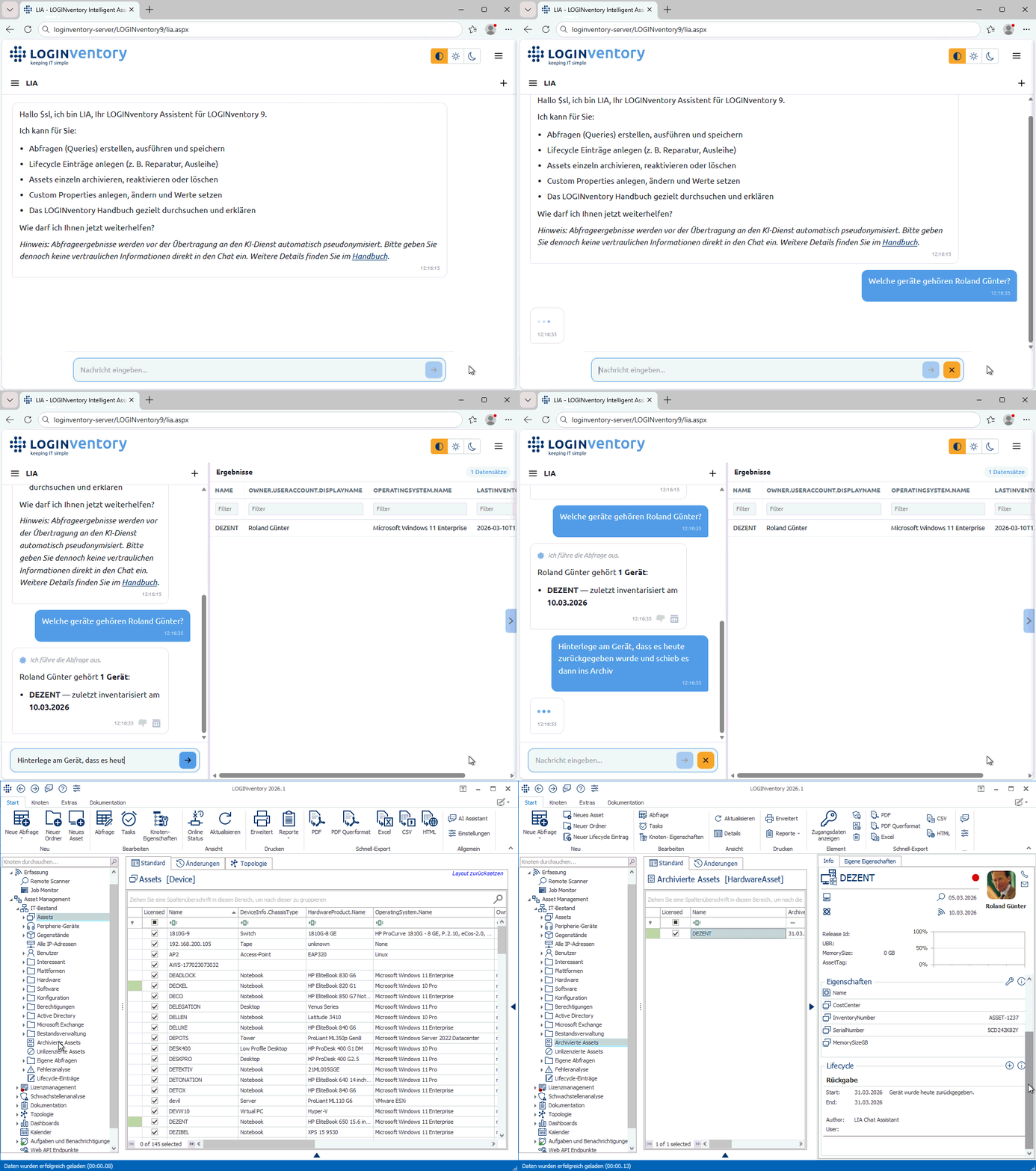
NewAI integration: Using the new LIA chat assistant (available via the web interface and in the LOGINventory Management Center), you can ask questions about your LOGINventory database through a chat (e.g. “Show me my Windows 11 devices!“, “Which Windows devices don’t have 7-Zip installed?“, “Which devices belong to John Doe?“) as well as about the documentation (e.g. “How do I publish the Web Viewer?“, “How do I retrieve warranty data?“). The chat can also be used to set properties and lifecycle entries on assets, archive or delete devices, and create queries. More information on the new AI integration here.
NewWeb interface facelift and feature enhancements:
Asset detail page: MAC address table for switches now viewable.
In the Web Viewer, dashboards are no longer visible only as their own nodes, but also when pinned as the view for a folder.
Tip: Pinning a dashboard to the Asset Management node displays it directly when the web console is opened (instead of an empty folder view).
New option to generate dashboard links (without displaying the tree structure), ideal for sharing with other people (provided they have been granted permission to view the dashboard).
Dark mode available.
When creating lifecycle entries (including issue / return), you can now create a new user, e.g. when issuing a device to a person without an AD account.
NeuNegotiate / Kerberos Support: Bei der Inventarisierung von Windows-Geräten wird jetzt nicht mehr nur NTLM, sondern auch Kerberos verwendet. Standardmäßig wird weiterhin die NTLM-Authentifizierung versucht, scheitert diese, gibt es einen Fallback zu Kerberos. Über die neuen Kommandozeilenparameter //Authentication Kerberos und //Authentication NTLM lässt sich auch die Verwendung einer anderen Methode ohne Fallback erzwingen.
Offline Agent: Version 9.5: Verbessertes Verhalten beim Selfupdate: Verhindern von automatischen Reboots. Achtung: Diese Änderung gilt erst für künftige Updates (z.B. auf Offline Agent Version 9.6).
Portable Version: Verbesserungen bei der Ermittlung der zu kopierenden Pfade: Zuverlässigkeit beim Zugriff via Kommandozeile erhöht.
Eigene Eigenschaften: In der Verwaltungsoberfläche der Eigenen Eigenschaften ist das Hinzufügen-Symbol jetzt immer sichtbar.
Datenansicht: Löschen und Archivieren von Assets führt nicht mehr dazu, dass die aktuelle Tabellen-Ansicht nach oben springt – der Scroll-Fortschritt bleibt erhalten.
Verbessertes Verhalten beim Selfupdate: Verhindern von automatischen Reboots. Achtung: Diese Änderung gilt erst für künftige Updates (z.B. auf Offline Agent Version 9.6).
Offline Agent: Fehler behoben, der dazu geführt hat, dass Updates von Version 9.3 auf Version 9.4 nicht durchgeführt werden konnten – ProductCode angepasst.
Build 9.9.1.17804 (03.06.2025):
OfflineAgent.aspx: Fehler behoben, der dazu geführt hat, dass Offline Agenten keine inv-Dateien an die OfflineAgent.aspx-Seite mehr schicken konnten, wenn der Offline Agent im Kontext eines Users gelaufen ist, welcher nicht im LOGINventory-Berechtigungskonzept hinterlegt war.
Web API: Formatierungsfehler in den JSON-Antworten behoben.
Asset-Detail-Seite (Web): Fehler behoben, der bei eigenen Eigenschaften ohne Kategorie auftrat.
You are currently viewing a placeholder content from Facebook. To access the actual content, click the button below. Please note that doing so will share data with third-party providers.
You are currently viewing a placeholder content from Instagram. To access the actual content, click the button below. Please note that doing so will share data with third-party providers.
You are currently viewing a placeholder content from X. To access the actual content, click the button below. Please note that doing so will share data with third-party providers.