Intune and LOGINventory
Intune manages the devices you’ve entrusted to it. LOGINventory finds everything on your network and knows considerably more about every device. Many of our customers use both. Neither replaces the other.
30 days, full network size, full feature set.
| Your question | Intune | LOGINventory |
|---|---|---|
| Are my servers discovered? | Servers can’t be enrolled | yes, Windows and Linux |
| What’s connected to switch X on port 12? | no | yes, from the MAC tables, with a network map |
| Who has the device, and did they sign for it? | assigned to a user | yes, handout with signature on a phone |
| Can I roll out software to 300 computers? | yes | no |
“We already have Intune.”
We hear that a lot, and it’s a fair point. Intune is already in place, usually paid for, and it shows a list of devices. So why an inventory?
Anyone who has Word can still put Excel to good use. Both come from Microsoft, both contain text and numbers, and yet nobody would think of replacing one with the other. It’s similar with Intune and LOGINventory: both deal with devices, but each is built for a different task.
Intune is there to manage devices.
It enforces policies, distributes software, controls updates, and secures access to Microsoft 365. It needs the device list as its working basis.
LOGINventory is there to know and document your IT.
Every device on the network, with everything that can be read from it, and with the documents that result.
The overlap is smaller than you’d think. For a Windows computer, both show the name, the model, the user, and when the device last checked in. After that, the paths diverge.
Just because you manage your Windows computers doesn’t mean you have IT asset management.
What Intune can do and LOGINventory can’t
First of all: Intune and LOGINventory aren’t competing against each other. With Intune, Microsoft builds a device management platform, closely tied to Windows, Entra ID, and its own security tools. We’ve been building inventory software since 2002. Those are different weight classes and different tasks.
What Intune can do and we can’t:
Enforce policies. Configuration, encryption, compliance, and Conditional Access through Entra ID. LOGINventory reads the state of a device. It can’t change it.
Distribute software and control updates. Roll out programs to hundreds of computers, approve and monitor Windows updates.
Manage phones and tablets. iOS and Android in full, with separate work and personal areas.
Lock or wipe devices remotely when a laptop is lost.
Set up new computers without IT lifting a finger, with Windows Autopilot straight from the factory.
And it’s often already paid for. Intune is included in Microsoft 365 Business Premium, E3, and E5.
If you need that, you need Intune or a comparable tool. LOGINventory replaces none of it and doesn’t try to.
What Intune doesn’t see
Intune knows the devices that are enrolled with it. That follows from its task: it can only manage what can be managed. For a complete inventory, that leaves quite a bit missing.
- Servers. Servers can’t be enrolled in Intune. According to Microsoft’s platform list, Intune supports Windows only as a client operating system and Linux only as a desktop. With Defender for Endpoint, servers do appear in the device list and receive security settings, but that doesn’t enroll them. Servers are exactly what every audit, every emergency manual, and every license balance asks about first. LOGINventory discovers Windows and Linux servers with hardware, software, and file shares.
- The network. Switches, routers, firewalls, printers, NAS systems, UPS units. None of these devices can be enrolled in Intune. LOGINventory queries them via SNMP and reads from the switches which device is connected to which port. The network map is built from that.
- Virtualization. Hosts, their hardware, and which virtual machine runs on which host.
- Everything nobody has enrolled. The computer in the storeroom, the test device, the contractor’s laptop, the server under a desk in the branch office. Intune can’t show them because it knows nothing about them. And these are exactly the devices that cause trouble in an audit. LOGINventory finds them when it scans the network, without anything having to be installed on them.
- Mailboxes and their permissions. Intune manages devices, not mailboxes. LOGINventory reads Exchange, on-premises and in Exchange Online: which mailboxes exist, who may access which one, and who may send mail on behalf of others. When someone leaves the company, if not before, that’s the question that matters.
Even for the devices Intune manages, discovery works differently. The hardware inventory in Intune exists only for Windows. It has to be switched on through a policy, and a dedicated agent on each computer collects the data. LOGINventory queries the computers through protocols that are already active on the network. How that works and which platforms are covered is explained on the Agentless discovery page.
Intune: 3 of 13 devices, only the enrolled ones.LOGINventory: 13 of 13 devices, found when scanning the network.
 Topology
Video on YouTube (German), opens in a new tab.
What LOGINventory knows about a device
Where Intune manages a device, LOGINventory describes it. And that includes the computers Intune knows about.
Every computer in detail. LOGINventory reads the hardware down to the serial numbers of the individual components, plus the health of battery and SSD, so that you replace devices before they fail. It records who logged on and when, including failed attempts, and when the computer was started up and shut down. Then there are services, drivers, and shared folders with their permissions. Everything lands in the inventory and can be analyzed across all devices.
Intune can query some of these values live from a single computer, such as the services or the event log, as long as the device is reachable. That doesn’t produce an inventory you can analyze across all devices and over time.
A few more examples that come up constantly in day-to-day work:
Monitors and docking stations at the workstation.
When scanning a PC, LOGINventory reads the connected displays with model, serial number, and screen size. It detects docking stations the same way, with model, serial number, and firmware, provided the manufacturer’s driver is installed. Who has which monitor and which dock, what comes along when someone moves, where is an old model still sitting? Neither appears in Intune.
The warranty.
LOGINventory automatically looks up warranty data from Dell, HP, and Lenovo and shows which devices will soon go out of warranty. Intune shows warranty data only for Microsoft’s own Surface devices. Which manufacturers are supported is listed in the documentation.
What no scan delivers.
Purchase price, cost center, contract number, location: as custom properties they sit right on the device and can be analyzed like any value that was read out.
Accessories and items.
Headsets, docking stations, keys: even what can’t be scanned, you manage in the same inventory. The Peripherals and other items page shows what that looks like.
SN 5CD3241XQ7SN S6P7NF0WDell P2723D · SN CN0F4X2KDell P2723D · SN CN0F4X3LDell WD19S · FW 01.00.20What you do with it
An inventory isn’t an end in itself. What counts is the work that becomes easier because of it.
Hand out devices, with a signature
Intune assigns a user to a device. Who received it and when, with which accessories, and whether the terms of use were signed isn’t recorded there.
In LOGINventory, you scan the label with your phone, select the recipient, have the terms of use displayed, and hand her the device to sign on the display. You tick off the charging cable and bag along the way. The entry in the device’s lifecycle history is created in the process; nobody adds it afterward. Return works the same way. The documentation describes the setup.
Documents that update themselves
The inventory produces designed documents with your logo: client and server documentation, a switch with everything connected to it, the handout record of a device. Plus dynamic documents such as the emergency manual based on the BSI template, or the operations manual. You write the text once; the data in it is current every time you open it. Examples are on the IT documentation page.
Analyze without a query language
For custom analyses of the device inventory, Intune offers Device Query, with queries in the KQL language. For administrators, that’s a good tool; for the site manager or purchasing, less so.
In LOGINventory, every list is a query that you adjust in the editor: choose columns, set filters, without a line of code. If you’d rather ask in plain language, let LIA (AI Assistant) build the query. You assemble dashboards yourself with drag & drop. And through sharing, each site manager sees exactly their own subset.
Licenses at a glance
Intune shows which software is installed on the managed Windows computers. Whether you have enough licenses for it is a different question. LOGINventory compares purchased licenses with installations and calculates by the vendors’ rules, down to the core requirement of virtual servers from the host’s hardware. More on the software asset management page.
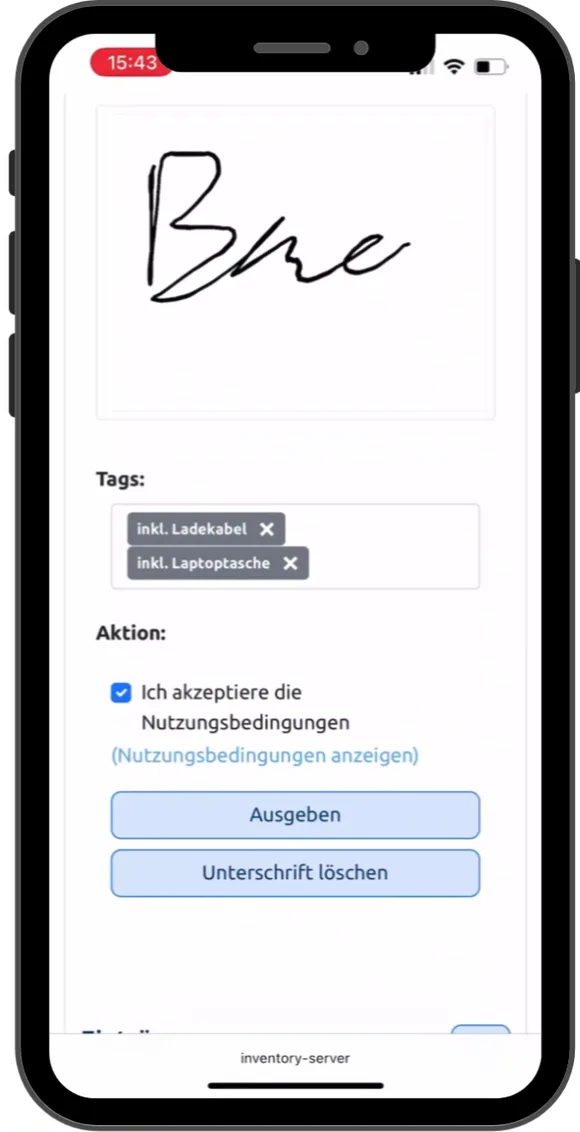 Play video: Device handout on a phone, 0:43, no sound
Both together: Intune as a data source
If you use Intune, LOGINventory pulls in the devices managed there through the Microsoft Graph API. You get everything in one overview: servers, switches, printers, and computers from the network scan, phones and tablets from Intune.
- Mobile devices come with model, operating system, serial number, IMEI, phone number, mobile carrier, and assigned user. That lets you issue, take back, and document them like any other device.
- Windows computers from Intune are merged with the scan. If a computer is scanned directly, its values take precedence. Intune fills in what the scan doesn’t reach.
- The compliance status from Entra ID can be brought along as a custom property and used in any query.
Because both sit in one database, LOGINventory answers two questions that neither tool can answer alone:
Which computers on the network are missing in Intune?
Scanned, but never enrolled. These are exactly the devices you can’t search for in Intune.
Which devices in Intune never show up on the network?
Managed, but seen nowhere: in a home office, in a closet, or lost.
The integration is based on an extensible PowerShell script that we maintain and support. If you need more values from Intune, add them yourself. The connection needs only read permission on the managed devices. How to set up script-based inventory is described in the documentation. You’ll find all other integrations under Integrations and APIs.
Intune and LOGINventory: who answers which question
| Your question | Intune | LOGINventory |
|---|---|---|
| Which devices are on my network, including the ones that aren’t enrolled? | enrolled devices only | all that respond on the network |
| Are my servers discovered? | Servers can’t be enrolled | yes, Windows and Linux |
| What’s connected to switch X on port 12? | no | yes, from the MAC tables, with a network map |
| Printers, NAS, UPS, virtualization hosts? | no | yes |
| Which monitor and which docking station is connected to which PC? | no | yes, with model and serial number |
| How much longer will the SSD in this laptop last? | no | yes |
| Who logged on to this computer and when, and when was it running? | last logged-on user, more only through a live query on the individual device | yes, with logon and startup history |
| When does this laptop’s warranty expire? | Surface devices only | yes, lookup from Dell, HP, and Lenovo |
| Who has access to which mailbox, and who may send on behalf of others? | no | yes, Exchange on-premises and Exchange Online |
| Who has the device, and did they sign for it? | assigned to a user | yes, handout with signature on a phone |
| Emergency manual and server documentation as PDF? | no | yes, with current data |
| Does anything have to be installed on the computers? | yes, agent for the hardware inventory | no, agentless |
| Custom analyses across all devices? | Device Query in KQL, managed company devices only | yes, in the query editor without code, or with LIA |
| Do I have enough licenses for software Y? | installations visible | yes, SAM Edition |
| Can I enforce a policy? | yes | no |
| Can I roll out software to 300 computers? | yes | no |
| Can I lock or wipe a lost phone? | yes | no |
| Can I set up new computers without lifting a finger? | yes, with Autopilot | no |
● yes · ◐ partly · ○ no
When Intune alone may be enough
There are environments where Intune is enough for management. All workstations are Windows computers, Macs, and phones, and all are enrolled in Intune. Servers run only in the cloud, you don’t need to document network devices, and no audit is coming up.
Even then, LOGINventory still brings a good deal: analyses across all devices without a query language, for example where an update or a piece of software is missing, a reminder before the warranty ends, handout with signature, and sharing that lets each site manager see their own subset. Whether that’s worth it for you, a trial shows fastest.
When you need LOGINventory in addition
- You run servers on-premises and have to document them, for the audit, the emergency manual, or the license balance.
- You want to know what’s really on the network. Including the devices nobody ever enrolled.
- Your network should be documented. Switches, ports, printers, and everything connected to them, as a network map.
- You issue devices and have recipients sign for them. With a signature on the phone and accessories in the same step.
- You plan replacement and warranty. With warranty data from the major manufacturers and the monitors and docking stations at the workstation.
- You want to know who can access which mailbox. From Exchange on-premises or Exchange Online, including the right to send on behalf of others.
- You have to demonstrate a complete inventory, for example for ISO 27001 or NIS2.
- You need a license balance that adds up, by the vendors’ rules and down to the core requirement of virtual servers.
Intune and LOGINventory: the most common questions
Does LOGINventory replace Intune?
No. LOGINventory doesn’t distribute software, enforce policies, or manage phones. It takes inventory and documents. Many of our customers use both side by side.
Can Intune inventory servers?
Servers can’t be enrolled in Intune. Microsoft supports Windows there only as a client operating system and Linux only as a desktop. If you use Microsoft Defender for Endpoint, you see servers in the Intune device list and can assign security settings to them. That doesn’t enroll them in Intune.
Is Intune IT asset management?
Intune is a device management tool. For the devices it manages, it shows hardware and installed software. IT asset management covers more: all devices on the network including servers, network, and peripherals, their lifecycle history from handout to decommissioning, warranty, documentation, and licenses. LOGINventory is built for that, and with Intune as a data source, no managed device is missing from it either.
Does LOGINventory need an agent on the computers?
No. LOGINventory queries computers, servers, and network devices through protocols that are already active on the network. For laptops that are rarely on the company network, there is an Offline Agent or a logon script. Both are optional, not required.
So is our inventory data in the cloud?
No. LOGINventory runs on a Windows computer in your network, and the database stays with you. The Intune integration only reads from Intune and writes nothing back.
What does the Intune integration need?
An app registration in Entra ID with read permission on the managed devices, and the LOGINventory Remote Scanner, which runs the script. The steps are in the script itself and in the documentation.
Try it alongside Intune
The fastest way to see the difference is to run LOGINventory next to Intune for a day and compare what each one finds.
The trial license covers your entire inventory.
30 days, full network size, full feature set. Only then will you also see servers, switches, and the devices that are missing from Intune.
Request trial license →Or get started right away.
LOGINventory is permanently free for up to 20 devices, without registration.
Download for free →