Lansweeper alternative
Lansweeper reliably finds what’s on your network. Much of what comes after that is missing there, lives in the cloud, or needs a bigger plan. As an alternative to Lansweeper, LOGINventory offers device handout, documents, and analyses in one application that runs entirely in your own network.
30 days, full network size, full feature set.
| Feature | LOGINventory | Lansweeper |
|---|---|---|
| Device handout with signature on the phone | yes | no |
| Full feature set when operated in your own network | yes | local version without API, interactive dashboards, diagrams, and Lens Chat |
| Queries build on each other: the upper one pre-filters all below it | yes, to any depth | saved views sit side by side |
| Support by phone | yes, in Munich, in German or English | ticket portal, phone call only on the Enterprise plan for high-severity issues |
| Connected monitors without a license of their own | yes | count as their own asset from November 5, 2026 |
What comes after discovery
Anyone who uses Lansweeper has usually chosen it deliberately. Its discovery is thorough, it recognizes devices even without credentials, and it merges matches from different sources into a single record. There’s little to criticize there.
The question is what you want to do with the result.
Issuing and documenting devices.
Lansweeper’s QR codes lead to a device’s page. There is no handout with signature there. What you can pass on are tables and dashboard tiles. A designed document such as an emergency manual doesn’t come out of that.
Analyzing data and assigning access.
Interactive dashboards, network diagrams, the API, and the ability to restrict who sees which devices are available only on the cloud platform. In the local version, everyone who may see assets sees all of them. The documentation doesn’t mention queries that build on each other for either version.
Getting help.
Technical support runs through a ticket portal. Lansweeper provides a phone call only on the Enterprise plan, and there only for high-severity issues.
License size and license balance.
Up to 100 devices are free, the smallest paid plan starts at 2,000, and from November 5, 2026, every monitor counts there as an asset of its own. A license balance based on the software vendors’ rules is an add-on product from a partner there, bookable from the Pro plan.
Taken together, these points form a pattern: Lansweeper is built around discovery. What comes after that is missing, lives in the cloud, or needs a bigger plan.
With LOGINventory, that’s part of the same application and runs on your server: handout with signature, dashboards, reports and documents, queries that build on each other with sharing down to the individual query, network map, and integrations. You reach support through our landline number in Munich. License size grows in steps of 25 devices. And software asset management is an edition of the product, not an offering from a partner.
There’s one more question that’s easy to overlook when comparing. If you start with Lansweeper for free, you create a cloud Site, and the inventory is stored at AWS. A purely local installation still exists. It’s just not the route by which you get to Lansweeper, and it lacks part of what the platform can do.
With LOGINventory, the inventory is in your network. Always, and with the full feature set.
- LOGINventoryLansweeper
- Handout with signaturemissing
- Designed documents like an emergency manualmissing
- Queries that build on each othermissing
- Restricting who sees which devicescloud only
- Interactive dashboardscloud only
- Network diagramscloud only
- APIcloud only
- Support by phoneEnterprise only
- License balance by software vendor rulespartner product from Pro
- License in steps of 25 devicesfrom 2,000 assets
With LOGINventory: everything in the same application, on your server.
Device handout with signature on the phone
Lansweeper also generates QR codes. In the local version, they lead to the device’s page in the web console, and there you see what’s known about the device. A handout to an employee, with terms of use and signature, can’t be processed with that.
With LOGINventory, that is exactly what the label is for. You scan it with your phone, choose the recipient, have the terms of use displayed, and hand over the device for their signature on the display. You tick off the charging cable and bag as tags too. The entry in the device’s lifecycle history is created in the process; nobody adds it afterward.
Return works the same way: scan the label, choose Return, done. And every employee can see for themselves in the browser which devices are assigned to them and when they signed for what.
Label templates are available for laptops, monitors, network devices, and small items such as headsets. You adjust the format and content to your needs.
How this looks for headsets, docking stations, and keys is shown on the page Peripherals and other items. The setup is described in the documentation.
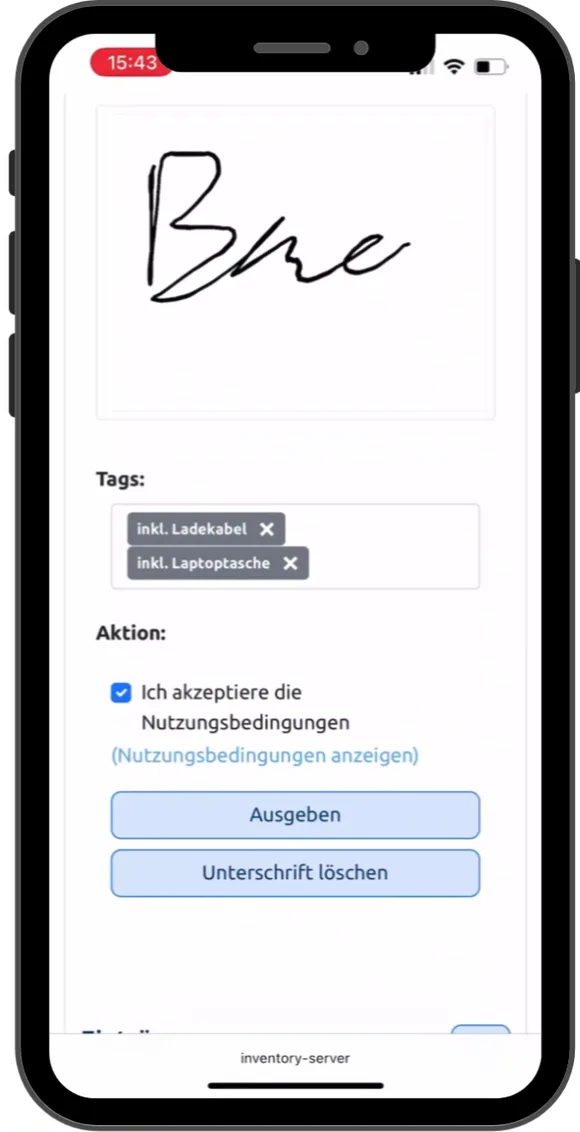 Play video: Device handout on a phone, 0:43, no sound
Queries, dashboards, and reports: each for its purpose
What Lansweeper calls “reports” is called a query at LOGINventory: an analysis whose result is a table. On the cloud platform, Lansweeper replaces them with dashboards, and custom reports are being retired there at the end of 2026. According to the documentation, what you can pass on are tables and dashboard tiles, as CSV, Excel, or image. The documentation doesn’t mention designed documents for filing or passing on.
LOGINventory has all of that, separated by purpose, and you design it yourself.
Queries
Queries are for looking things up. Every list in the LOGINventory tree is a query, from all devices to the computers without a current update. Each one can be customized without SQL: in the query editor you pick the columns from everything that’s discovered and set filters. If you’ve created a custom property such as the purchase price, it’s a column there like any other. If you’d rather not click, you describe in natural language what you want to see, and LIA (AI Assistant) builds the query.
Dashboards
Dashboards are for working. You can adapt the ones that come with the product, and you build your own in the editor with drag & drop from tables, charts, and filters. If you want, a click on a bar also filters the other charts, and drill-down takes you into the details. And a dashboard takes over the filter of the query it sits under: under the query for one location, the same dashboard shows only that location’s devices. This works in the application and in the web interface, both on your server.
On the Lansweeper Platform, a dashboard draws its data from four datasets, not all of which can be linked to each other, according to the documentation. In the local version, custom widgets are programming work in ASPX and SQL.
- Warranty: Windows 11
- Warranty valid168
- expires soon31
- expired13
- Warranty: Windows 10
- Warranty valid39
- expires soon31
- expired48
- Warranty: Windows Server
- Warranty valid29
- expires soon10
- expired7
- Warranty: Linux
- Warranty valid18
- expires soon6
- expired4
Reports
Reports are for passing on: designed documents with one purpose. Client and server documentation, a switch with everything attached to it, the access rights of a user, the handover certificate of a device. With your logo, as PDF.
Dynamic documents
Dynamic documents are continuous text as in Word, with inventory data in it: management summary, operations manual, emergency manual based on the BSI template, GDPR evidence. You write the text once. The data in it is current every time you open it.
You adapt reports and documents or create new ones, and you drag the fields in with drag & drop. If you want, a task saves them regularly or sends them by email. Examples are on the IT documentation page.
| Model | Dell PowerEdge R450 |
| Processors | 2 × 10 cores |
| Serial number | 7XK2QH3 |
| \\SRV-FS01\Projekte | Projects: Change |
| \\SRV-FS01\FiBu | Accounting: Read |
Queries build on each other, and everyone sees their own slice
If you put one query under another, the upper one pre-filters it. Under the query for the Munich location, the software list shows only what’s installed in Munich, and the list of computers without a current update shows only the Munich ones. You attach the same structure, linked, under Berlin and Hamburg. What you add in Munich then appears there too.
Sharing is attached to the same nodes. You share queries, dashboards, and documents with users or groups from Active Directory, and everything below inherits the filter. For each node, you decide whether someone can only view, edit data, or create their own queries. The boundary can be a location, a cost center, or any other attribute in the inventory. If the person responsible creates their own analyses or a document below it, the same filter applies there. How to create and share structures is described in the documentation chapters Queries and Sharing.
On the Lansweeper Platform, saved views sit side by side, each with its own filter, and you share them with specific accounts or with everyone. The documentation doesn’t mention one view building on another. Lansweeper restricts who sees which devices there through fixed criteria: asset type, asset domain, IP location, location, or installation. In the local version, roles only regulate which functions someone may use. Anyone who may see assets sees all of them.
-
Locations
-
Location Munich Filter: Location = Munich
Shared with: Munich admins
- Software Packages
- Without current update
- Dashboard
- Location Berlin linked to Munich Shared with: Berlin admins
- Location Hamburg linked to Munich Shared with: Hamburg admins
-
Location Munich Filter: Location = Munich
Shared with: Munich admins
On-premises or cloud: where your inventory is stored
Many of our customers don’t want their inventory with a US provider, not even in a data center in Europe.
Lansweeper describes itself as cloud-delivered SaaS. If you start for free, you create a Site, and according to Lansweeper’s Trust Center the data is stored on Amazon Web Services, in Europe or in the US, your choice. Lansweeper still offers a purely local installation (on-premises). According to the vendor’s comparison, it lacks, among other things, the API, the interactive dashboards, and the network diagrams. So if you want to keep your data in-house, you have to do without part of the product with Lansweeper.
The reason a storage location in Europe is not enough on its own is the US CLOUD Act. It requires US providers to hand over data when ordered to, regardless of which country the server is in. In June 2025, Microsoft France admitted before the French Senate that it could not rule this out for customer data. The same legal situation applies to other US providers.
A data center in Europe alone doesn’t help: the US CLOUD Act applies regardless of where the server is located.
You install LOGINventory in your own network, with the full feature set. The database stays in-house, and no feature requires a cloud connection.
The only exception is optional, and we describe it openly: if you use LIA, your question goes to Azure OpenAI, Microsoft’s language model service, along with at most 25 result rows per request. Computer names, user names, and locations are replaced with placeholders beforehand and only resolved again on your server. Numbers, date values, and GUIDs stay as they are. The query itself runs locally. If you don’t want that, you switch LIA off in the settings. The data flow in detail is described in the documentation.
NB-0412 → [Device 1], S. Berger → [Person 1], Hamburg → [Location 1].
Numbers, date values, and GUIDs stay as they are.
Optional: if you don’t want that, switch LIA off in the settings.
Support you can call
At Lansweeper, technical support runs through a ticket portal. How quickly the first response is supposed to arrive depends on the plan: for medium- and low-severity issues and for questions, Lansweeper’s support page gives a target of 48 support hours on the Starter plan and 24 on the Pro plan. A phone call is provided only on the Enterprise plan, for high-severity issues and by appointment.
Anyone using the free version doesn’t get technical support, but a knowledge base, training materials, and the community. The community’s forum is currently read-only, and the conversation continues on Reddit.
With us, you call. At +49 89 4488870 you reach us in Munich and speak to someone who answers your question in German or English. If that’s faster, we look at your screen with you through remote support. And if you write to us, you usually have a first reply within two hours. Support is included in LOGINventory360 and in maintenance, and during the trial phase it’s included anyway. All ways to reach us are on the Support page.
- Ticket in the portal
- Starter plan target: 48 support hours
Pro plan: 24 support hours. Phone only on Enterprise, for high-severity issues.
- Call: +49 89 4488870
- Reply in German or English
In writing, usually within two hours, contractually 12 hours during service hours. Remote support if needed.
What counts as an asset
From November 5, 2026, Lansweeper counts every monitor as its own asset, the same as a computer or a server. Until now, that applied only to monitors with extended display data. If you don’t want monitors counted, you keep them out of the inventory, according to Lansweeper.
An example. 1,500 workstations with two monitors each, plus 500 other devices: servers, virtual machines, switches, and printers.
At Lansweeper, that is 5,000 assets, 3,000 of them monitors. The smallest paid plan ends at 2,000, and for this inventory you need the Pro plan there.
At LOGINventory, it’s 2,000. A monitor belongs to the computer it’s attached to and needs no license of its own. You still see which monitors are connected where, with model and serial number, and the client documentation lists them too.
If you want to manage individual monitors as objects of their own, for example because you issue them for home office use and have them signed for, you create them as a peripheral device directly from the computer’s monitor data. They have a license class of their own, add-on assets, at roughly a quarter of the price of a regular asset. You decide which monitors those are.
A network map that lasts
Lansweeper shows network diagrams on the cloud platform, and the product does a good job of mapping which device is connected to which switch port. For documenting a network, however, the diagrams are missing quite a bit.
According to the vendor, they have to be generated manually before you can view them. If you move objects to a different position, that arrangement is lost on the next reload. The documentation doesn’t mention custom shapes or labels. Diagrams are exported as images. And in the local version, the diagrams don’t exist at all.
The network map in LOGINventory is built from the MAC tables read from the switches and runs on your server. The arrangement is saved, with a separate map for each location or floor. You put a floor plan in the background, label devices with values from the inventory, and add your own shapes and connections. When it opens, the map is compared against the current state: new connections are marked green, changed ones dashed, and devices without a connection get an orange outline. As a PDF, it goes to anyone who needs it.
License requirement derived from the hardware
Anyone running virtual Windows Servers licenses by the host’s processor cores, not by installations. A minimum of eight cores per processor, a minimum of sixteen per host, and in Standard Edition, a full license set covers two virtual machines.
An example. A host with two processors of ten cores each, running six virtual Windows Server Standard. Counted, that is six installations. What’s needed is sixty core licenses: twenty per license set, three sets for six VMs.
LOGINventory calculates this from the discovered data. The host’s processors and cores are in the inventory, and so is the assignment of the VMs to the host; minimum values and the difference between Standard and Datacenter are stored. When a VM is added or the hardware changes, the requirement changes with it.
Lansweeper can count purchased licenses against installations. The software vendors’ licensing logic sits there in the partner’s add-on product. If you want it, you first need the Pro or Enterprise plan and then add it per asset. With us, it’s the SAM Edition of the same application, and switching to it is possible at any time without a price disadvantage. More on the page about software asset management.
LOGINventory and Lansweeper compared
| Feature | LOGINventory | Lansweeper |
|---|---|---|
| Agentless discovery | yes | yes |
| Mapping devices to switch ports | yes | yes |
| Automatic warranty lookup from the manufacturer | yes | yes |
| Importing devices from Intune and other MDM systems | yes | yes |
| Network, OT, and cloud devices in one shared database | yes | yes |
| Device handout with signature on the phone | yes | no |
| Designed reports and documents as PDF, such as server documentation or an emergency manual | yes | export of tables and dashboard tiles |
| Queries build on each other: the upper one pre-filters all below it | yes, to any depth | saved views sit side by side |
| Building and customizing your own dashboards | yes, locally too | interactive only in the cloud, from four datasets |
| Restricting visible devices per user or group by query | yes, by any attribute in the inventory | in the cloud by fixed criteria, not at all locally |
| Support by phone | yes, in Munich, in German or English | ticket portal, phone call only on the Enterprise plan for high-severity issues |
| Committed response time to requests | 12 hours during service hours, contractually | target of 12 to 48 support hours depending on the plan, no commitment |
| Network map with saved arrangement and custom elements | yes | diagrams only in the cloud, arrangement is not saved |
| Network map export as PDF | yes | export as image |
| REST API, read and write | yes, in every edition | only in the cloud, full access only on the Enterprise plan |
| AI assistant for questions in natural language | yes, also with a local installation, can create entries | only in the cloud, read-only |
| Full feature set when operated in your own network | yes | local version without API, interactive dashboards, diagrams, and Lens Chat |
| License size | in steps of 25 devices | smallest paid plan with 2,000 assets |
| Connected monitors without a license of their own | yes | count as their own asset from November 5, 2026 |
| Managing monitors and accessories as objects of their own | as add-on asset at roughly a quarter of the asset price | full asset |
| Keeping decommissioned devices with their history, without a license | yes, in the archive up to the license size | keep counting until they are deleted |
| Trial phase | 30 days | 14 days |
| License balance by software vendors’ rules | yes, SAM Edition | partner add-on product, from Pro, per asset |
| Core license requirement of virtual servers from the host hardware | yes | base module counts installations |
| Operation without an installation of your own | no | yes, as a cloud platform |
| Free use up to 100 devices | no | yes |
| Identifying manufacturer and model of unknown devices by fingerprinting | no | yes |
● yes · ◐ partly · ○ no
When Lansweeper is the better choice
In some cases, Lansweeper is the better fit.
- You don’t want to operate anything yourself. Lansweeper runs as a cloud platform. LOGINventory needs a Windows computer in your network.
- You have fewer than 100 devices. Up to that point, Lansweeper is permanently free.
- You manage several thousand assets and mainly need the connection to security tools, ITSM, and CMDB.
When LOGINventory is the better fit
- Your inventory has to stay in your own network, and without giving up features to do so.
- You issue devices and have them signed for. Scan the label, sign on the phone, and the entry in the device’s lifecycle history is created along the way.
- You want to build dashboards around your questions and pass on documents. Server documentation, emergency manual, handover certificate, as PDF and with current data.
- You want to define by role who sees which data and who may edit it. Scoped by location, department, or any other attribute in the inventory. Those with permission build their own analyses within their slice.
- You want to be able to call when something’s stuck. In German or English, without an Enterprise plan and with a contractually committed response time.
- You have between 100 and 2,000 devices and want to pay for your own inventory, not for a package.
- You need a network map as documentation. Saved, labeled, with custom elements, and shareable as PDF.
- You want an AI assistant that also works with a local installation. It answers questions and creates entries on request.
- You need a license balance that adds up. By the software vendors’ rules, down to the core license requirement of virtual servers, without an add-on product.
Alternative to Lansweeper: the most common questions
Is Lansweeper still available as a local installation (on-premises)?
Yes, Lansweeper continues to offer the local version. According to the vendor, though, the API, interactive dashboards, network diagrams, and Lens Chat are available only on the cloud platform. If you stay local, you stay with the current scope. If you move to the platform, you create a Site in a region that can’t be changed later.
Where is the data stored at Lansweeper and where at LOGINventory?
If you start Lansweeper for free, you create a cloud Site. The data is then stored on Amazon Web Services, in Europe or in the US, your choice. A purely local installation still exists, but according to the vendor, it lacks the API and the interactive dashboards, among other things. You install LOGINventory in your own network, and the database stays in-house. The only exception is optional: LIA sends your question and at most 25 result rows to Azure OpenAI. LOGINventory replaces computer names, user names, and locations with placeholders beforehand. If you don’t want that, you switch LIA off in the settings.
We have 150 devices. Isn’t Lansweeper cheaper?
Up to 100 devices, Lansweeper is free. From the 101st device, according to Lansweeper’s pricing page, the smallest paid plan begins, and it includes 2,000 assets. LOGINventory is licensed in steps of 25 devices. What that means for your inventory is shown by the calculator on our pricing page.
Do LOGINventory and Lansweeper count the same devices?
Not quite. With LOGINventory, every successfully inventoried device needs a license. Monitors, keyboard, and software belong to the computer and don’t count extra. You move decommissioned devices to the archive. There they keep their history and don’t occupy a license. You can archive as many devices as your license size allows.
At Lansweeper, from November 5, 2026, every monitor counts as its own asset, until now only monitors with extended display data. Decommissioned assets keep counting until you delete them, and according to the vendor, deleting can’t be undone without restoring a database backup.
Do we need a server of our own for LOGINventory?
You need a Windows system in your network. That can be Windows 10 or 11; for production use, we recommend a Windows Server, often as a virtual machine. The setup includes SQL Server Express, which is sufficient for environments up to about 1,000 assets. Above that, we recommend a full SQL Server. In return, the database stays with you. The exact system requirements are in the documentation.
Can we import our data from Lansweeper?
Whatever comes from the network, LOGINventory discovers again on the first scan. What needs to be carried over is the information that no scan provides: purchase data, cost centers, contract numbers, assignments. For that there are the CSV import and the REST API. We don’t have a ready-made importer for Lansweeper.
Are you also comparing with Docusnap? There is a dedicated comparison of LOGINventory and Docusnap.
Try it in your own network
The fastest way to decide the question is to run LOGINventory alongside your existing solution.
The trial license covers your entire inventory.
30 days, full network size, full feature set.
Request trial license →15 minutes. With a technician.
You describe your environment: size, locations, what you want to solve. We tell you whether LOGINventory is the right tool for it.
Book a time →