i-doit and LOGINventory
i-doit is a CMDB. With it, you build a model of your IT: systems, services, dependencies, contracts, responsible people. With LOGINventory, you work on your IT every day, with the state your devices report. Both fall under “software for managing IT”. Each means something different, and some of our customers use both.
30 days, full network size, full feature set.
| Your question | i-doit | LOGINventory |
|---|---|---|
| Which devices are on the network, and what is installed on them? | as current as the last import from the discovery software | as current as the last scan, in the same product |
| Who received a device, and did they sign for it? | on paper: print, sign, scan | yes, paperless with signature on the phone |
| How many core licenses do my virtual servers need? | not described | yes, from the host’s hardware |
| Which IT service, for example time tracking, depends on which server? | yes | no |
Build a CMDB or work on IT
- Which laptops don’t have the latest update yet?
- On which computers does the warranty expire in spring?
- Who logged on to this server most recently?
- Which SSD won’t last much longer?
In LOGINventory, a query answers each of these questions, with no groundwork. LOGINventory reads the data from the devices itself, and nobody has to enter it beforehand. In a CMDB, the answers are only there if someone put them there beforehand, by hand or through discovery software.
That is not an oversight by i-doit; it follows from its purpose. A CMDB depends on being built up: defining object types, creating services, linking dependencies, storing contracts and responsibilities. In the end, there is a model that shows relationships no scanner can find. Until then, it is a project, and i-doit partners offer their own workshop packages for the rollout.
LOGINventory starts with the device. After the first scan, every device is in the inventory with hardware and software, and the scans keep it current. You see what is missing, what has changed, and what will soon need to be replaced, and you act before there is trouble.
- Business process
- Application
- Server
Define object types, create services, link dependencies. The answers are there if someone entered them beforehand, by hand or through discovery software.
NB-0233latest update missingPC-0378warranty ends in springSRV-APP02last logon: AdminNB-0412SSD won’t last much longer
After the first scan, with no groundwork. The scans keep it current.
What i-doit can do as a CMDB and LOGINventory can’t
If you need a CMDB, you are in the right place with i-doit. That is its strength:
Model relationships. Custom object types and categories, services, relations and dependencies between any objects. Which business process depends on which IT service, and who is responsible for it?
Play through the impact. With an add-on module, i-doit simulates the failure of a system and shows which services are affected. It calculates service costs and checks the quality of the data.
Racks, cabling, rooms, and buildings. Where a server sits in the rack, which cable goes to which patch panel, how a floor is divided.
Contracts, service providers, and responsibilities as separate objects in the model, linked to the systems they apply to.
ISMS, emergency management, data protection, and BCM as modules, built on the same data basis.
Deployment of your choice. i-doit is available as a cloud service, as an on-premises installation, also on Linux, and as a free open-source edition. You install LOGINventory on a Windows computer with SQL Server in your network.
Where the data comes from
i-doit doesn’t come with network inventory of its own and doesn’t scan the network itself. For automatic discovery, you buy additional software from another manufacturer that scans the network and passes the results to i-doit. Or you simply use LOGINventory for that.
With LOGINventory, discovery is a built-in part of the product. It discovers computers, servers, network devices, virtualization, and Exchange by itself, without agents. How that works is explained on the page Agentless discovery.
What you do with LOGINventory every day
Every device in detail
LOGINventory reads out the hardware down to the serial numbers of the individual components. You see the condition of battery and SSD, so you can replace laptops before they fail. Connected monitors and docking stations (with the manufacturer’s driver) appear on the computer, and the warranty is added automatically for Dell, HP, and Lenovo. LOGINventory records who logged on when, including failed attempts, and when a computer was running, so you can spot anything unusual. Plus services, drivers, missing updates, shared folders with their permissions, and, from Exchange, the mailboxes along with access rights. All from one source, and all of it can be analyzed across all devices.
Ask questions without setting anything up first
Every list in LOGINventory is a query that you adapt in the editor: choose columns, set filters, without a line of code. If you’d rather ask in plain language, let LIA (AI Assistant) build the query. You put dashboards together by drag & drop. Because the data comes from the scan, the answer is there as soon as you ask.
SN 5CD3241XQ7SN S6P7NF0WDell P2723D · SN CN0F4X2KDell P2723D · SN CN0F4X3LDell WD19S · FW 01.00.20Get notified when something happens
Tasks in LOGINventory can be based on any value that is read out: the SSD at the end of its lifespan, the certificate on a server that is about to expire, the computer that is missing an update. The notification arrives because something changed on the device, not because someone maintained a date.
- SSD at end of life
NB-0233, remaining lifespan 6% - Certificate expires soon
SRV-WEB01, 14 days left - Update missing
PC-0378,NB-0198, and one more computer
Paperless handout, with signature on the phone
In LOGINventory, the handout is completely digital. You scan the label with your phone, show the employee the terms of use, and she signs directly on the display. Accessories such as the charging cable and bag are part of the same step, and the entry in the device’s lifecycle history is created along the way. No printout, no scanner, no filing. How to set this up is described in the documentation.
And every employee sees in the browser, on their own page, which devices are currently assigned to them and when they received each one, with all entries from the lifecycle history. They don’t need a role in LOGINventory for this; if you like, they simply log on with their Windows account. More on this in the documentation.
With i-doit, the handout runs on paper. The add-on module for documents generates the handover certificate, which is printed, signed by hand, scanned, and uploaded again.
- Generate certificate
- Sign by hand
- Scan
- Upload
- Scan the label
- Show terms of use
- Sign on the display
The lifecycle history entry is created along the way.
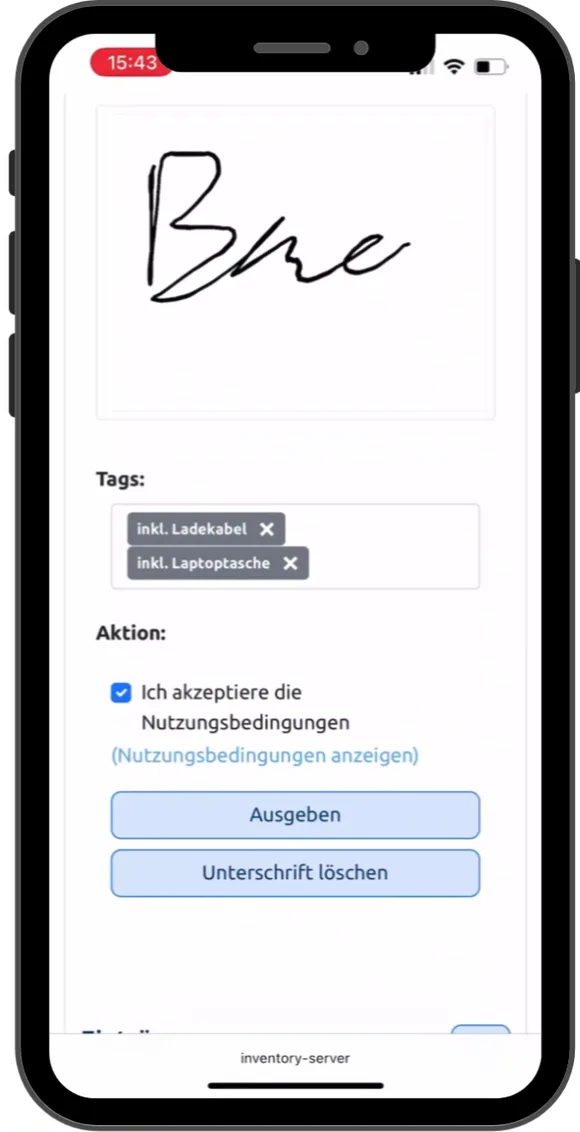 Play video: Device handout on a phone, 0:43, no sound
Documents, network map, and licenses
Documents such as client and server documentation or the emergency manual based on the BSI template are produced from the inventory, with the data current when opened. Examples are on the page about IT documentation.
You document racks and cabling in i-doit. The network map in LOGINventory is created from the switches’ MAC tables that have been read out, and when opened, it marks which connections are new and which have changed.
If you run virtual Windows Servers, you get the requirement for core licenses calculated from the host’s hardware, according to the vendors’ rules. More on the software asset management page.
Using i-doit and LOGINventory together
Some of our customers run i-doit as a CMDB and work with LOGINventory day to day. The devices then get into the CMDB without retyping: through the API hub OpenCelium, which we work with, or by CSV export. You don’t need any additional discovery software.
In i-doit, you maintain the model with services and dependencies. Condition, logons, warranty, and handouts stay where you work with them every day: in LOGINventory. More on the integration is in the post LOGINventory and OpenCelium (German) and under Integrations and APIs.
i-doit and LOGINventory compared: who answers which question
| Your question | i-doit | LOGINventory |
|---|---|---|
| Which devices are on the network, and what is installed on them? | as current as the last import from the discovery software | as current as the last scan, in the same product |
| Who received a device, and did they sign for it? | on paper: print, sign, scan | yes, paperless with signature on the phone |
| How many core licenses do my virtual servers need? | not described | yes, from the host’s hardware |
| What is the condition of this laptop’s battery and SSD? | only if another manufacturer’s discovery software provides it | yes, from the scan |
| Who logged on when, including failed attempts? | only if another manufacturer’s discovery software provides it | yes, from the scan |
| Who may access this file share, and who may access which mailbox? | only if another manufacturer’s discovery software provides it | yes, with the effective permissions |
| Does every employee see for themselves which devices are assigned to them? | not described | yes, in the browser |
| What has changed in the network map since the last saved state? | not described | yes, marked when opened |
| Do queries build on each other, so that the upper one pre-filters all those below it? | only for the opened object, as a variable report | yes, to any depth |
| Which IT service, for example time tracking, depends on which server? | yes | no |
| What fails if this server fails? | yes, with an add-on module | no |
| In which rack, at which patch panel? | yes | no |
| ISMS, emergency management, data protection as modules? | yes, with add-on modules | emergency manual based on the BSI template from the inventory data, no modules |
| Deployment as a cloud service or on Linux? | yes | no, Windows with SQL Server |
● yes · ◐ partly · ○ no
When you need i-doit
- You want to document relationships. Services, dependencies, responsible people, and what happens when a system fails.
- You document the data center and cabling. Racks, patch panels, rooms.
- You are building an ISMS or emergency management and want to set it up on the CMDB.
- You have the time and people for the rollout and ongoing maintenance of a model.
When you need LOGINventory
- You want to know where your IT stands right now. Which devices are on the network, what is installed, what is missing, without anyone entering it beforehand.
- You work with your IT every day. Queries, dashboards, and notifications from the condition of the devices: SSD at end of life, missing update, expiring warranty.
- You hand out devices and have them acknowledged. Paperless, with signature on the phone, and every employee sees for themselves what is assigned to them.
- You want results quickly. Install, enter the scan range, and the inventory is there the same day.
- You need a license balance that adds up, down to the core requirement of virtual servers.
When you combine both
- You run i-doit or are planning to and don’t want to enter the devices by hand. Discovery runs in LOGINventory, where your team also hands out devices, analyzes, and gets notified.
i-doit and LOGINventory: the most frequently asked questions
What is the difference between i-doit and LOGINventory?
i-doit is a CMDB: you model systems, services, dependencies, contracts, and responsibilities. LOGINventory discovers your IT by itself, keeps the state of the devices current, and is the tool for the daily work with it: queries, handouts with signature, notifications, documents. You can combine the two.
Is LOGINventory a CMDB or an alternative to i-doit?
No, LOGINventory is not a CMDB in the sense of i-doit. It doesn’t model services and dependencies and doesn’t know racks and cabling. It is a possible alternative if you mainly want to know which devices are on the network, what runs on them, and what changes, and you don’t want to build a model for that. If you need both, you use both.
How do devices get into i-doit automatically?
i-doit doesn’t scan the network itself. Automatic discovery needs additional software, which is licensed separately. LOGINventory can take on that role: the devices get into i-doit with name, type, model, serial number, and operating system through the API hub OpenCelium, or alternatively by CSV export.
Is i-doit free, and is LOGINventory available for free too?
i-doit is available as the free open-source edition i-doit Open. According to the manufacturer, it is aimed at “individual IT admins managing and documenting a smaller number of IT assets efficiently.” It doesn’t come with automatic discovery, and you run it on your own web server yourself. LOGINventory is free forever for up to 20 devices, with no registration, and discovers those devices itself. For your entire inventory, there is the trial license for 30 days.
Does LOGINventory also run on Linux?
No. LOGINventory needs a Windows computer in your network; for production use, we recommend a Windows Server. The setup includes SQL Server Express, which is sufficient for environments up to about 1,000 assets; above that, you connect a full SQL Server. LOGINventory can also discover Linux servers and clients.
Try it in your network
The fastest way to see the difference is to let LOGINventory run in your network for a day. By evening, the inventory is there, and you know which questions it answers for you.
The trial license covers your entire inventory.
30 days, full network size, full feature set.
Request trial license →Or get started right away.
LOGINventory is free forever for up to 20 devices, with no registration.
Download for free →