baramundi and LOGINventory
baramundi manages your endpoints: distributing software, applying updates, controlling mobile devices. LOGINventory is your IT asset management software: it knows every asset on your network and follows it from procurement to decommissioning. Many of our customers use both, each for its own task.
30 days, full network size, full feature set.
| Your question | baramundi | LOGINventory |
|---|---|---|
| Who has this laptop, and did they sign for it? | assignment of contact and cost center | yes, handout with signature on the phone |
| When does this laptop’s warranty expire? | no lookup at the manufacturer | yes, lookup at Dell, HP, and Lenovo |
| Emergency manual and server documentation as PDF? | no | yes, with current data |
| Can I roll out software to 300 computers? | yes | no |
baramundi and LOGINventory: two tasks
Both take inventory of devices. Still, they are built for different tasks.
baramundi is a device management platform.
The baramundi Management Suite rolls out software, installs operating systems, distributes patches, manages smartphones and tablets, and provides remote control. Inventory supplies the basis for this: you have to know what runs on a device before you manage it.
LOGINventory is built for IT asset management.
Every device on the network, with everything that can be read out, and with what happens afterward: who received it, when the warranty expires, where it sits on the network.
baramundi says so itself. The manufacturer’s documentation (German) says the following about the asset functions (translated from German):
“The baramundi Assets do not replace a complete asset management system.”
They are meant as stock keeping: you can see which devices are on hand and ready for use.
For customers who use both, the split usually looks like this: software distribution and mobile devices run through baramundi. Asset management, handouts with signature, reports, and analyses run through LOGINventory.
The mobile devices from baramundi also reach LOGINventory via bConnect.
What baramundi can do and LOGINventory can’t
First off: in device management, baramundi plays in a different category. LOGINventory doesn’t compete there.
Distribute software. Package programs and roll them out to hundreds of computers.
Apply patches. LOGINventory shows which devices are missing a particular update. It can’t install the update.
Install operating systems. Set up and configure new computers automatically.
Manage smartphones and tablets. iOS and Android, with profiles for Wi-Fi and email, for example.
Control computers remotely. From the same console.
As a hosted service. If you don’t want to run your own server, you can get the suite as a service from baramundi. LOGINventory runs in-house.
If you need that, you need baramundi or a comparable tool. LOGINventory replaces none of it.
What LOGINventory adds to baramundi
baramundi knows what is installed on a device. LOGINventory also knows what has happened to the device since it came into the company.
The lifecycle history of every device
In LOGINventory, an asset begins with the order. You can create devices before delivery, with invoice, purchase price, cost center, and a ready-made label. On the first scan, LOGINventory recognizes them by serial number and merges the data.
From then on, everything collects on the device: handouts and returns, repairs, notes, entries from other systems. These lifecycle entries are kept permanently, even after the device has long been decommissioned. Years later, you can still trace who had it and when. And because purchase date, warranty, and condition are in one place, you see early which devices need to be replaced next year.
- Mar 2, 2026 Created before delivery Invoice, cost center, label printed
- Mar 9, 2026 First scan Matched by serial number, data merged
- Mar 10, 2026 Hand out to S. Berger Terms of use signed, with charging cable and bag
- Jun 18, 2026 Repair Battery replaced, note on the device
- Nov 2, 2026 Return Owner cleared, available again
- Jan 15, 2030 Decommissioned History is preserved
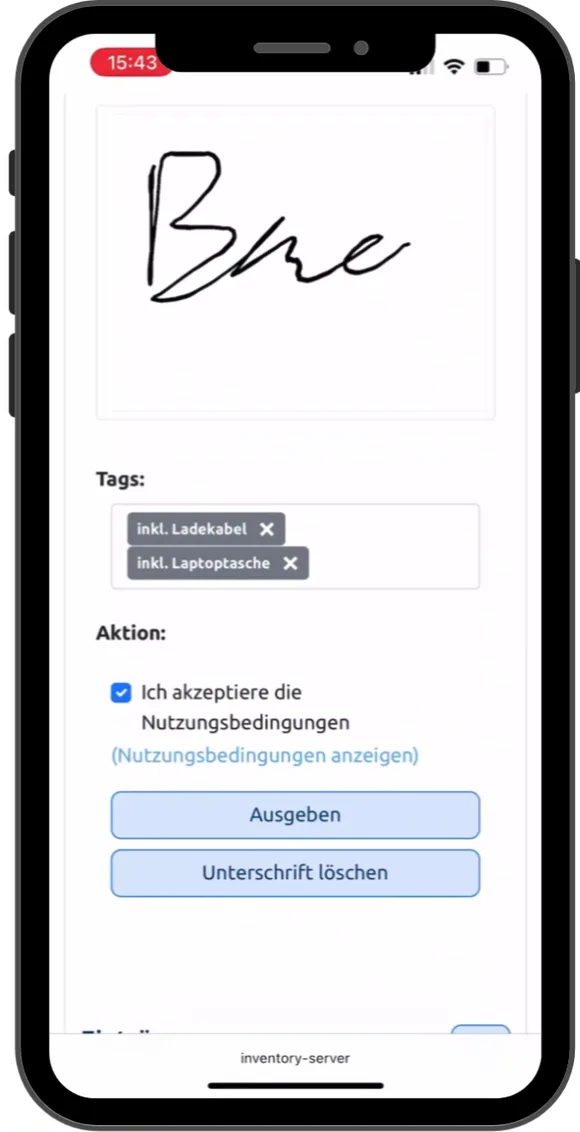
Device handout, with signature
You handle the handout on your phone: scan the label, choose the recipient, display the terms of use, have them sign. Accessories such as the charging cable and bag are recorded in the same step. The lifecycle entry and the handover certificate are created automatically, and the return works the same way. The documentation describes how to set this up under Hand Out / Return.
In baramundi, you assign a contact and a cost center to an asset. A handout with signature doesn’t appear in baramundi’s documentation.
Keeping track of the warranty
LOGINventory retrieves the warranty data from Dell, HP, and Lenovo automatically and shows which devices are about to fall out of warranty. baramundi doesn’t have this lookup. The documentation lists the supported manufacturers.
 Play video: Device handout on a phone, 0:43, no sound
Documents that update themselves
The inventory produces designed documents with your logo: client and server documentation, a switch with everything connected to it, the handover certificate of a device. Plus dynamic documents such as the emergency manual based on the BSI template. You write the text once, and the data in it is current every time it’s opened. Examples are on the page about IT documentation.
| Model | Dell PowerEdge R450 |
| Processors | 2 × 10 cores |
| Serial number | 7XK2QH3 |
| \\SRV-FS01\Projekte | Projects: Change |
| \\SRV-FS01\FiBu | Accounting: Read |
Analyses and dashboards in the application
In LOGINventory, every list is a query that you adapt in the editor, without a line of code. If you’d rather ask in plain language, let LIA (AI Assistant) build the query. From your queries, you put together dashboards yourself by drag & drop. You decide whether a click on a bar filters the other charts and a double click goes one level deeper.
Queries build on each other. Under the query for a location, each further query shows only that location’s devices, and through sharing the site manager sees exactly that subset. For each node, you decide whether someone can only view, edit data, or create their own queries.
In its console, baramundi offers views and a start page with up to six predefined widgets. For custom reports, baramundi relies on a separate data warehouse with Power BI, as described in baramundi’s reporting tutorial.
- Warranty: Windows 11
- Warranty valid168
- expires soon31
- expired13
- Warranty: Windows 10
- Warranty valid39
- expires soon31
- expired48
- Warranty: Windows Server
- Warranty valid29
- expires soon10
- expired7
- Warranty: Linux
- Warranty valid18
- expires soon6
- expired4
A network map you can work with
Both show which device is connected to which switch port. baramundi presents this in a Network Map with ports on the connections.
With the network map from LOGINventory, you document your network:
- One map per location or floor. Each map is generated from a query and saved. You create as many as you need.
- On your floor plan. In the map, the devices sit where they sit in the building.
- Changes at a glance. When you open a saved map, LOGINventory highlights what has changed since: new devices, re-plugged cables, disconnected connections. What that looks like is shown in the documentation under Highlighting of changes.
- Labeling by your rules. From values in the inventory and your own text.
- VLANs and virtual machines. VLANs are shown on the connections, virtual machines at their host.
Inventorying Windows computers and servers without an agent
For software distribution and remote control, baramundi needs an agent on the device; that is in the nature of the task. The inventory of a Windows computer also runs in baramundi as a job that the baramundi Management Agent executes on the device. Network devices, Linux devices, and industrial devices, on the other hand, baramundi discovers without an agent as well.
LOGINventory queries Windows computers and servers over protocols that are already active on the network. Nothing has to be installed on the devices. A computer that lacks the baramundi agent still shows up in LOGINventory with hardware and software. Laptops that are rarely on the company network report in through an Offline Agent or a logon script. Both are optional, not required. How this works is explained on the page Agentless discovery.
Licenses
baramundi offers its own license module in which you maintain licenses and contracts and compare them against installations. In the SAM Edition, LOGINventory calculates by the vendors’ rules, down to the core requirement of virtual servers derived from the host’s hardware, and reminds you of cancellation deadlines before a contract renews. More on the software asset management page.
- PC-0231 Agent
- PC-0233 Agent
- NB-0412 Agent
- PC-0378 no agent
- PC-0231
- PC-0233
- NB-0412
- PC-0378
Queried over protocols that are already active on the network. Nothing is installed on the devices.
Both together: baramundi as a data source
If you manage smartphones and tablets with baramundi, you can bring them into LOGINventory through the bConnect interface. You get everything in one overview: computers, servers, switches, and printers from your own scan, mobile devices from baramundi.
The mobile devices arrive with model, manufacturer, serial number, and operating system. That way you can issue, take back, and document them like any other device, with signature and an entry in the lifecycle history.
The integration is based on an extensible PowerShell script that we maintain and support. If you need more values from baramundi, you can extend the script yourself. The integration needs only an API key with read access. How script-based inventory is set up is described in the documentation. You’ll find all other integrations under Integrations and APIs.
Do you want baramundi only for inventory?
Some people look at baramundi because they first want to know what is on their network. Distributing software or managing phones isn’t on the agenda yet; what they have in mind is mainly the inventory module, baramundi Inventory.
For an inventory with lifecycle history, handouts, warranty, and documentation, you don’t need a device management platform or an agent on every Windows computer. LOGINventory discovers your network without any preparation on the devices. How network inventory works is shown on the dedicated page.
Our prices are on the website, with a calculator for your network size. And if software distribution comes later after all, the two work side by side, as described above.
baramundi and LOGINventory: who answers which question
| Your question | baramundi | LOGINventory |
|---|---|---|
| Who has this laptop, and did they sign for it? | assignment of contact and cost center | yes, handout with signature on the phone |
| What has happened to this device since we bought it? | current status with costs and assignment | yes, permanent lifecycle history with handouts, repairs, and notes |
| When does this laptop’s warranty expire? | no lookup at the manufacturer | yes, lookup at Dell, HP, and Lenovo |
| Emergency manual and server documentation as PDF? | no | yes, with current data |
| Custom dashboards directly in the application? | start page with up to six predefined widgets, reports via data warehouse and Power BI | yes, from your own queries |
| What is connected to switch X on port 12? | yes | yes |
| A network map per location, on the floor plan? | a Network Map | yes, any number of saved maps |
| What has changed on the network since last time? | no | yes, new, re-plugged, and disconnected connections highlighted |
| Does anything have to be installed on Windows computers and servers? | yes, the baramundi Management Agent | no, agentless |
| Do I have enough licenses for software Y? | yes, license module | yes, SAM Edition |
| Can I roll out software to 300 computers? | yes | no |
| Can I apply missing patches? | yes | no, only show where they are missing |
| Can I manage phones and tablets? | yes | no, only import them from baramundi |
| Can I control a computer remotely? | yes | no |
● yes · ◐ partly · ○ no
When baramundi alone may be enough
If you mainly manage devices and need the inventory only for that, baramundi covers it. The current state of each device is enough for you, and handouts, warranty, and documentation happen elsewhere or not at all.
Even then, LOGINventory adds a few things: analyses and dashboards directly in the application instead of through a separate data warehouse, queries that build on each other, and sharing that lets each site manager see exactly their own subset and edit only what they are permitted to.
When you need LOGINventory as well
- You hand out devices and have them acknowledged. With a signature on the phone and accessories in the same step.
- You want to know what has happened to a device. Who had it, when it was repaired, what was noted about it, even years later.
- You plan replacements and warranty. With warranty data from Dell, HP, and Lenovo and the purchase data on the device.
- You have to document your IT, for ISO 27001 or NIS2, for example, with an emergency manual whose inventory data is always current.
- You want your network documented. As a map per location, on the floor plan, with changes at a glance.
- You want to analyze for yourself. With your own queries and dashboards directly in the application, without a separate data warehouse.
- You want to see the devices that have no agent running, too. Windows computers and servers, without installing anything.
- You need a license balance by the vendors’ rules, down to the core requirement of virtual servers.
baramundi and LOGINventory: the most frequently asked questions
What is the difference between baramundi and LOGINventory?
baramundi manages endpoints: it distributes software, applies patches, installs operating systems, and manages mobile devices. LOGINventory is IT asset management software: it inventories the network without an agent and follows every asset from procurement through handout and warranty to decommissioning. Many of our customers use both side by side.
Does LOGINventory replace baramundi?
No. LOGINventory doesn’t distribute software, apply patches, or manage phones. It inventories, documents, and follows every asset through its lifecycle.
Is baramundi IT asset management software?
Not in the full sense. The baramundi Management Suite is a device management platform with an inventory as its basis, and the manufacturer itself writes, in its German-language documentation, that its asset functions do not replace a complete asset management system. IT asset management covers the lifecycle of every device, from procurement through handout and warranty to decommissioning, plus documentation and licenses. That is what LOGINventory is built for.
Is LOGINventory an alternative to baramundi?
Not for device management. If you are considering baramundi mainly for inventory, LOGINventory is the leaner choice: it discovers Windows computers without an agent, tracks every device with lifecycle history and handout, and the price is on the website.
What does baramundi cost?
baramundi doesn’t publish prices. It is licensed per device and per module, so if you want inventory, network devices, and license management, you combine several modules. The manufacturer gives the exact price on request. LOGINventory’s prices are on the website, with a calculator for your network size.
We already have baramundi. Do we have to record the computers twice?
No, not by hand. LOGINventory scans the computers itself, without an agent and without any involvement from baramundi. From baramundi, you import only the mobile devices, so you don’t have to record them a second time.
Does LOGINventory need an agent on the computers?
No. LOGINventory queries computers, servers, and network devices over protocols that are already active on the network. For laptops that are rarely on the company network, there is an Offline Agent or a logon script. Both are optional, not required.
Is LOGINventory also available as a hosted service, like baramundi?
No. LOGINventory runs on a Windows computer in your network, and the database stays with you.
How can baramundi be connected to LOGINventory?
Through baramundi’s bConnect interface. You need an API key, created following baramundi’s instructions, and LOGINventory’s Remote Scanner, which runs the script. Smartphones and tablets with iOS and Android are imported, with model, manufacturer, serial number, and operating system. The integration only reads and writes nothing back to baramundi. The steps are in the script itself and in the documentation under script-based inventory.
Try it alongside baramundi
The fastest way to see the difference is to let LOGINventory run next to baramundi for a day: create a network map, hand out a device, open the emergency manual.
The trial license covers your entire inventory.
30 days, full network size, full feature set.
Request trial license →Or get started right away.
LOGINventory is free forever for up to 20 devices, with no registration.
Download for free →