Docusnap alternative
Docusnap documents what is in your network. LOGINventory is the interface where you work with it: from goods receipt through device handout to decommissioning.
30 days, full network size, full feature set.
| Feature | LOGINventory | Docusnap |
|---|---|---|
| Device handout with signature on the phone | yes | no |
| Self-service: employees see their own devices | yes | no |
| Custom analyses without SQL | yes, in the query editor or via LIA | column selection only; filters and custom data views in SQL |
| Free forever | up to 20 devices | no, 30-day trial |
The difference isn’t in discovery
Both solutions inventory agentlessly, both come from Germany, both have been on the market for over twenty years. Both read data from Windows, Linux, macOS, SNMP devices, and virtualization hosts. Anyone looking for a winner here is looking in the wrong place.
The difference lies in what the two products are built around.
Docusnap is built around the document.
The vendor itself describes the aim of its own asset management like this: to document the life cycle of assets, from acquisition to decommissioning. Accordingly, the path to the result runs through reports, templates, and IT concepts that need to be configured.
LOGINventory is built around the work.
Documents are created with LOGINventory too, and the emergency manual even updates itself. But they are a byproduct, not the purpose.
Ask yourself how often you actually need both. You need an emergency manual once a year, when the auditor comes. You hand out a device this week. And again next week.
At the end of a Docusnap project, you have a file. At the end of a day with LOGINventory, you have work done.
A day with your data
The quickest way to see the difference is a device on its way through your company.
Before the device has even arrived
You’ve ordered ten laptops, and delivery is next week. You can start right now anyway: create assets, attach the invoice, set the cost center, print labels.
When the devices arrive, you apply the labels. At the first scan, LOGINventory recognizes by serial number that it already knows the assets and merges the data. No duplicates are created that someone would have to clean up afterward.
If you handle procurement in SAP or another system, you can also have assets created from there through the REST API.
The device goes out
Ms. Berger gets the laptop. You scan the label with your phone, select her as the recipient, have the terms of use displayed, and hand her the device for her signature. She signs with her finger on the screen.
That was the whole process. The entry in the device’s lifecycle history is created along the way; nobody adds it afterward. From that moment on, Ms. Berger can see in the browser herself which devices are assigned to her, without asking anyone. How to set up the handout is described in the documentation.
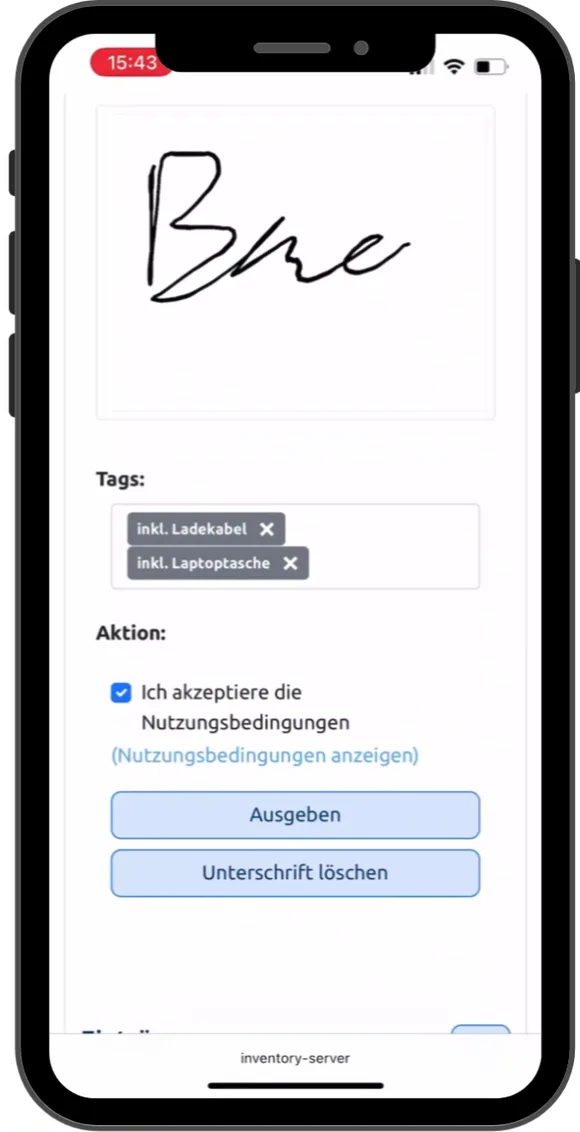 Play video: Device handout on a phone, 0:43, no sound
This is where the two paths split. In Docusnap, you would open the asset, select the user from the inventoried Active Directory, and save. The result is correct documentation. The process itself, handing the device out and signing for it, happens separately, on paper or in another system.
The device is in use
This is where you spend most of your time, and this is where the difference comes up every day.
You have a question and double-click. You look at the software on Ms. Berger’s laptop, see a package, and want to know where else it is installed. Double-click it, and you have the list. No name to remember, no switching to another view, no report you have to configure first. It goes on like that everywhere: from a user to their devices, from a switch to what’s connected to it, from a license to its installations.
- NB-0412
- PC-0233
- PC-0378
- SRV-TS01
- …
And if you like, just ask. “Show me all Windows 11 devices with less than 8 GB RAM.” LIA (AI Assistant) builds the query from that and runs it. If you prefer to click, keep clicking: you can build the queries by hand in the query editor just the same. LIA is included in the price, not an add-on module.
If you have your own AI tools in-house, you can connect them directly to the inventory database through the MCP server.
You get asked before you ask. Tasks run in the background and report back when a condition you set yourself is met. An SSD is nearing the end of its life. A certificate expires in three weeks. A warranty ends next quarter. A contract renews automatically if nobody cancels. You can set the condition on any value that exists anywhere in the inventory. How tasks work is described in the documentation.
The device comes back
Ms. Berger changes departments. Scan the label, select Return, done. The entry stays in the device’s lifecycle history, the owner entry is cleared, and the laptop is available again.
If it is decommissioned, the history is preserved, even after the device disappears from the active inventory. You can still trace later who had it when and what ran on it.
- Mar 2, 2026 Created before delivery Invoice, cost center, label printed
- Mar 9, 2026 First scan Matched by serial number, data merged
- Mar 10, 2026 Hand out to S. Berger Terms of use signed, with charging cable and bag
- Jun 18, 2026 Repair Battery replaced, note on the device
- Nov 2, 2026 Return Owner cleared, available again
- Jan 15, 2030 Decommissioned History is preserved
LOGINventory and Docusnap side by side
| Feature | LOGINventory | Docusnap |
|---|---|---|
| Agentless discovery | yes | yes |
| Windows, Linux, macOS, SNMP devices | yes | yes |
| Virtualization (VMware, Hyper-V, XenServer, Proxmox) | yes | yes |
| Cloud (Azure, AWS, Microsoft 365, Entra ID) | yes | yes |
| Permission analysis on file shares | yes | yes |
| Multi-tenant | yes | yes |
| Automatic warranty lookup from the manufacturer | yes | yes |
| Device handout with signature on the phone | yes | no |
| QR labels that lead to a view you can work in | yes | no |
| Web interface with write access | yes | no, read-only |
| REST API, read and write | yes | not in the on-premises version |
| Self-service: employees see their own devices | yes | no |
| Restrict visible devices per user or group by query | yes, by any property in the inventory | per object or object type in the data tree |
| Create assets before delivery, match by serial number | yes | no |
| Custom analyses without SQL | yes, in the query editor or via LIA | column selection only; filters and custom data views in SQL |
| Queries build on each other: the upper one pre-filters all below it | yes, to any depth | custom SQL data views can only be narrowed to company or domain |
| AI assistant for queries in plain language | yes, included in the price | not in the product |
| Network map shows changes since the last saved state | yes | no |
| License requirement by formula, with minimum values and host-guest analysis | yes | manual correction value |
| Cancellation date separate from expiration date | yes | no |
| Free forever | up to 20 devices | no, 30-day trial |
| Document racks and cabling | no | yes |
| Model business processes and services as a CMDB | no | yes |
| Discover storage and backup systems | no | yes |
| Routing and other plan types | no | yes |
| Available as a cloud solution | no | yes |
| License unit | discovered devices, in steps of 25 | workstations and servers, SNMP devices free of charge |
● yes · ◐ partly · ○ no
More than one interface
The handout from the example above works only because there is an interface where an employee can enter something. That isn’t a detail, but the reason why some things work and others don’t.
In LOGINventory, several paths lead to the same data. The Management Center, when you analyze and configure. The browser, when someone takes over a device, returns it, or checks what is assigned to them. And the integrations, when another system needs a say: the REST API reads and writes, plus PowerShell, CSV, and the MCP server for your own AI tools.
Docusnap also lists a web client for the on-premises version. However, it is explicitly read-only: the vendor describes it as read-only access. You can’t enter or change data there; that stays reserved for the administrator console.
That also answers the question about the QR code on the label. In Docusnap, it could point to a read-only view. Nothing could be signed for.
In Docusnap, a REST API exists only in the cloud variant, Docusnap365, and so does the connection to Zapier and Power Automate. If you use the on-premises version and want to pass inventory data to another system, you don’t have this route.
Not what’s there, but where it’s missing
A single value on a single device rarely says much. It becomes interesting when you can compare it across the whole inventory.
- Which devices are missing this update?
- Where is encryption not active?
- Which computers report outdated virus signatures?
- Where is an operating system without support still running?
- Which software did we buy that nobody launches anymore?
- Who has local administrator rights without needing them?
- Which drives are nearing the end of their life?
These are the questions a working day starts with. None of them can be answered on a single device. All of them need the comparison across hundreds of devices.
Exactly this decides what LOGINventory reads: values that appear on many devices and can therefore be compared with each other. Hardware and serial numbers, installed software and version levels, firewall status and open ports, file shares and permissions, run times and status values.
A DNS server, by contrast, exists once in your organization. You can document it, but there is nothing to compare it with. Docusnap reads such single sources and puts them into a report. If you need that report, you’re better served there.
If you want to know where something is missing, though, you don’t need a report but a query. And it should land in your inbox on its own tomorrow morning if something has changed.

Custom queries without SQL, and everyone sees their own subset
Every list in LOGINventory is a query, and every one can be customized. In the query editor you choose columns from everything that is discovered and put together filters: with AND and OR conditions and relative date values like “within the last 90 days”. If you’d rather not click, tell LIA what you want to see.
Queries build on each other. Put one query under another, and the upper one pre-filters it. Under the query for the Munich location, the software list shows only what is installed in Munich, and the list of computers without a current update shows only the Munich ones. You attach the same structure, linked, under Berlin and Hamburg. Whatever you add in Munich then appears there too.
In larger organizations, several teams work with the same data, and not everyone should see everything. For that, sharing is attached to the same nodes. You share a query with users or groups from Active Directory, and everything below it inherits its filter: queries, dashboards, and documents. For each node, you define whether someone can only view, edit data, or create their own queries. Instead of the location, the boundary can be any property in the inventory: a cost center, a department, a device type. The documentation describes how to set up sharing.
In Docusnap, custom data views in the tree and custom reports are SQL queries. That is how Docusnap’s own guide (German) describes it. The guide is aimed at administrators experienced in SQL. Without SQL, it works there through Docusnap Connect, as long as you only select columns. There too, you write filters as an SQL condition. Docusnap assigns permissions to a single object in the data tree or to all objects of a type, such as a specific server or all workstations.
Bottom line: in Docusnap, a custom analysis with filters needs SQL, and permissions attach to objects, not to your analyses. In LOGINventory, everyone puts together their own analysis, for exactly the subset they are allowed to see, without IT having to build a list for every question.
-
Locations
-
Location Munich Filter: Location = Munich
Shared with: Munich admins
- Software Packages
- Without current update
- Dashboard
- Location Berlin linked to Munich Shared with: Berlin admins
- Location Hamburg linked to Munich Shared with: Hamburg admins
-
Location Munich Filter: Location = Munich
Shared with: Munich admins
License requirements that calculate themselves
If you run virtual Windows Servers, you know the problem: Microsoft licenses by the cores of the host, not by installations. At least eight cores per processor, at least sixteen per host, and in Standard Edition, one full license set covers exactly two virtual machines. For the third, you start over.
An example. A host with two processors of ten cores each, running six virtual Windows Server Standard instances.
A tool that counts installations shows you: six.
What you actually need: sixty core licenses. Twenty per license set, three sets for six VMs.
Between these two numbers lies the difference between a license balance you can rely on and one that is exposed in an audit. (Whether Datacenter instead of Standard pays off at this point is the next question, and that, too, is easier to answer when the numbers are right.)
LOGINventory calculates this from the discovered data. The host’s processors and cores are in the inventory, and so is the assignment of VMs to the host. The minimum values and the distinction between Standard and Datacenter are stored. If a VM is added or the hardware changes, the requirement changes with it.
At this point, Docusnap counts the processor cores of the system on which the software was found, that is, of the virtual machine. Anything that deviates from that is added by hand as a correction value. With three servers, that is a chore. With fifteen hosts and seventy VMs, it is a source of errors, and not only after a hardware change: every additional VM can change the requirement, and the correction value is then no longer correct.
And the date everyone forgets
Expiration date and cancellation date are two separate fields in LOGINventory. That sounds like a minor detail, until the first subscription that quietly renewed for another year because the reminder came on the expiration date and the notice period had ended three months earlier.
You enter both dates for each license, with a lead time you set yourself. The reminder comes by email, without anyone having to open a dashboard.
When Docusnap is the better choice
There are requirements we are not the right tool for. Here they are.
- You need a cloud solution. Docusnap365 runs as SaaS. You install LOGINventory in your own network, and there is no hosted variant. That is a fundamental decision, not a feature gap, but if you have already made it, the rest is moot.
- You document racks and cabling. Which device sits in which rack unit, which cable runs where: Docusnap covers that. We don’t.
- You want to discover storage systems and backup environments. Veeam, Veritas Backup Exec, storage arrays. Docusnap has them in its module list. We don’t.
- You need a report on individual server services. Docusnap reads Oracle databases, SharePoint, DNS, DHCP, or Cisco Meraki and puts them into the documentation. Why we handle this differently is explained in the section above.
- You model business processes and services. In Docusnap, you can create processes, organizational units, and business services and link them to IT, right down to the question of which process depends on which server. That is modeling work somebody has to do, and if you want to do it, you get the right tool there.
- Your network consists mostly of network devices. Docusnap doesn’t count switches, routers, and printers toward its license. We do. For an inventory with many SNMP devices and few workstations, that comes out cheaper there.
When LOGINventory is the better fit
- You want to know where something is missing. Not the state of one device, but the comparison across all of them: missing updates, inactive encryption, software without users, drives at the end of their life.
- You hand out devices and take them back. Scan the label, have them sign, done. Without a form, without entering anything afterward, with a record that lands in the device’s lifecycle history.
- Your people should be able to check for themselves which devices are assigned to them, instead of calling IT.
- You want to define, per role, who sees which data and who may edit it. Scoped by location, department, or any other property in the inventory. Whoever is allowed builds their own analyses within their subset.
- You want to move inventory data in both directions. The REST API reads and writes, plus PowerShell and CSV. What your procurement department creates is then in the inventory.
- You need a license balance that adds up. Especially with virtual Windows Servers, where the requirement comes from the host’s cores and not from the number of installations. More on that on the software asset management page.
- You want to try it out before talking to anyone. LOGINventory runs free forever for up to 20 devices, with no registration, for example on a test network. For your entire inventory, there is the trial license at full network size.
Docusnap alternative: frequently asked questions
Can we replace Docusnap one-to-one?
For network inventory, documentation, permission analysis, and software asset management, yes. Not for racks and cabling, not for modeling business processes, not for storage and backup systems, and not if you need a cloud solution. If one of these is central to you, tell us when we talk. Then we both save ourselves the demo.
Can existing data be carried over?
You don’t need to migrate anything that comes from your network: LOGINventory discovers it anew on the first scan. What needs to be carried over is the information nobody can scan, that is, purchase data, cost centers, contract numbers, and assignments. For that, you can use CSV import and the REST API. We don’t have a ready-made Docusnap importer.
What does LOGINventory cost in comparison?
The two license models can’t be compared directly, because they count differently. Docusnap licenses workstations and servers and leaves network devices out. With us, every device you actually discover counts, but you decide which device types those are. Our prices are openly listed on the pricing page, calculator included.
How much effort is it to get started?
Install, enter credentials, specify the scan range. The first results then appear in the console. If you like, we’ll walk through the setup together in one hour, which is included in Software Assurance.
We have a lot of switches and printers. Is it worth it?
Run the numbers. Docusnap doesn’t count network devices toward the license. We do. If your inventory consists mostly of SNMP devices and only a few workstations come on top, Docusnap can be cheaper. With us, though, you can freely decide which device types are discovered at all. Anyone who already manages the switches in another tool leaves them out.
Comparing with Lansweeper too? There is a separate comparison of LOGINventory and Lansweeper.
See for yourself
The fastest way to answer the question is to set both tools loose on your own network.
The trial license covers your entire inventory.
30 days, full network size, full feature set, including support during the trial.
Request trial license →Or get started right away.
Free forever for up to 20 devices. No account, no registration, no time limit.
Download for free →15 minutes. With a technician.
Describe your environment: size, sites, and what you want to solve. We’ll tell you whether LOGINventory is the right tool for it.
Schedule a time →